Time Off Types
Create vacation, sick, and other time off types; choose whether each is paid; and define how employees receive and carry their balances.
No login required. Opens in one click.
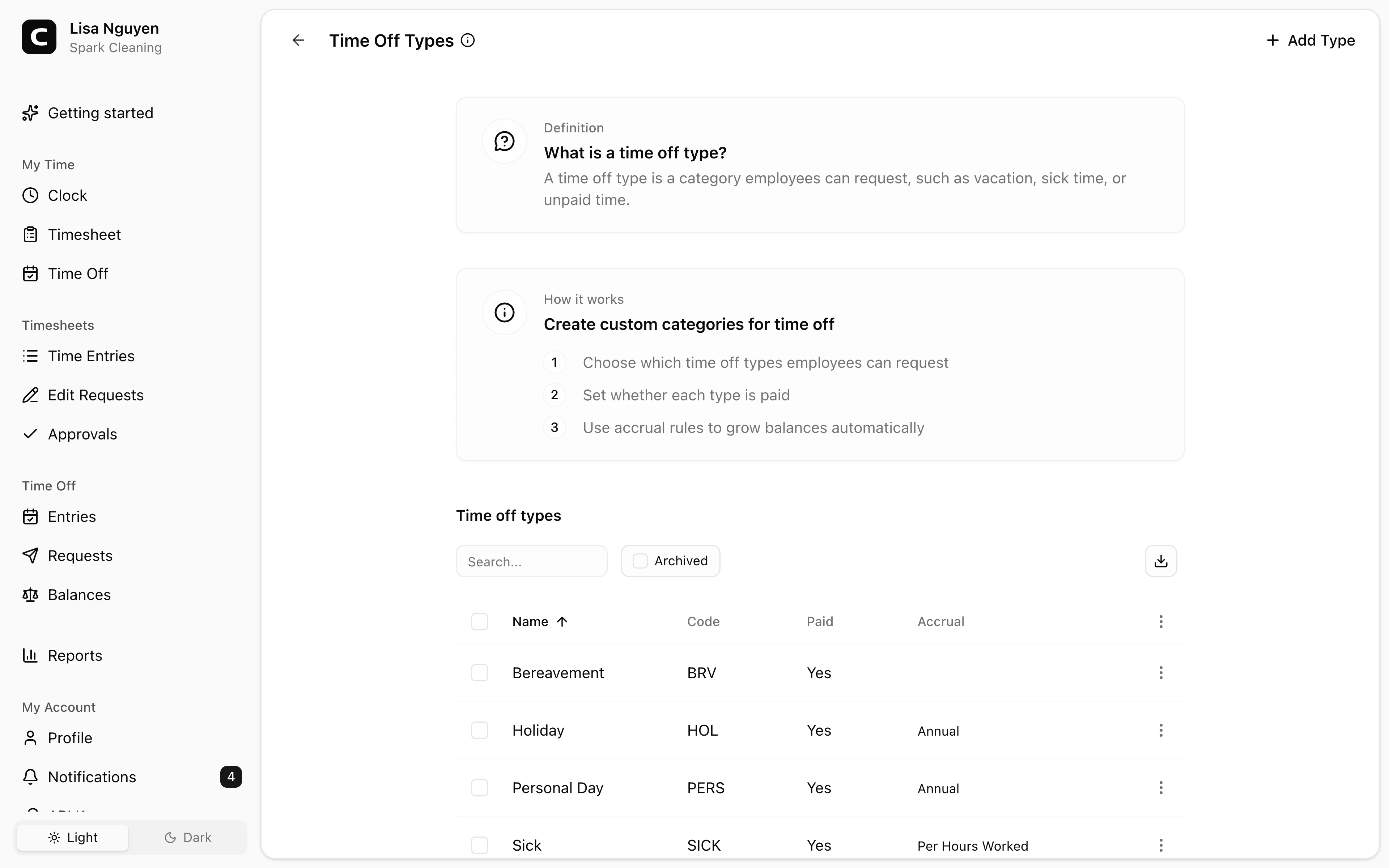
What you can set per time off type
- Name — required; what employees see when requesting time off.
- Code — required; use it to match against payroll or accounting systems.
- Paid — whether hours on this type are paid. Counts toward the Paid Time Off columns on Hours Summary and Payroll Summary; unpaid types count toward Unpaid Time Off.
- Accrual method, under Accrual policy — how balance grows over time:
- No accrual — no automatic accrual; an Administrator grants time manually through balance adjustments.
- Annual — a fixed number of hours per year. Prorate first year can reduce the first grant for a partial year.
- Each pay period — the annual total divided across weekly, biweekly, semi-monthly, or monthly periods.
- Hours worked — earn a set amount of time off for a set amount of hours worked.
- Accrual year starts — use the Calendar year (January 1) or the employee's Hire date anniversary.
- Waiting period in days — days from hire before accrual begins.
- Limits (optional, expand to configure) — max balance, max carryover, max usage per year, max accrual per year, and negative-balance allowance.
- Milestones (optional) — increase Annual and Each pay period accrual rates based on tenure.
Archiving
Open a time off type's menu and choose Archive to retire it. Open the Archived view and choose Restore to bring one back. Past time off on archived types stays visible in reports.
Common questions
- I changed an accrual rule. Does it affect past balances?
A policy change starts on its effective date, which defaults to today. Earlier periods keep the policy that applied then. A backdated change can recalculate accruals from that earlier date and change current balances. Existing manual adjustments and approved time off stay in the ledger.
- I want to reset one employee's vacation. What should I change?
First decide whether you want to adjust their current balance, change how time is earned, or correct a time off record. A balance adjustment adds or subtracts hours for one employee; it does not set an annual allowance. An accrual policy applies across employees, and creating another time off type does not make it an employee-specific policy. If the problem is a request or recorded time off, review that record instead. Before adjusting a balance, confirm the hours, effective date, and reason. If you describe the amount in days, confirm how many hours each day represents.
- An employee's balance didn't reset at year-end.
For a type with automatic accrual, check Accrual year starts and Max carryover. Carryover is applied on January 1 for Calendar year, or on the employee's anniversary for Hire date. With no carryover cap, unused hours carry forward. A cap of 0 carries no unused hours forward; a positive cap limits how much is carried. New-year accruals can add hours after that, so the resulting balance may not be zero.
- How do I give someone a one-time bonus of time off?
For a type with a balance view, open Time Off Balances, select the type, and choose View activity beside the employee. Choose Adjust balance, enter positive Hours, a Reason, and the Effective date, then select Adjust. If the type has no balance view, ask the Assistant to prepare the adjustment for your review. An adjustment adds hours for that employee without changing the shared accrual policy.
Clockspot keeps clock-ins, corrections, approvals, and payroll-ready hours connected so owners and managers can review the workweek before payroll.
Want to simplify how your employees track time? See how Clockspot works.