Team Update delivery readiness
Check which employees can receive Team Update email, SMS, or WhatsApp alerts and which will rely on the Team Updates page before you publish.
No login required. Opens in one click.
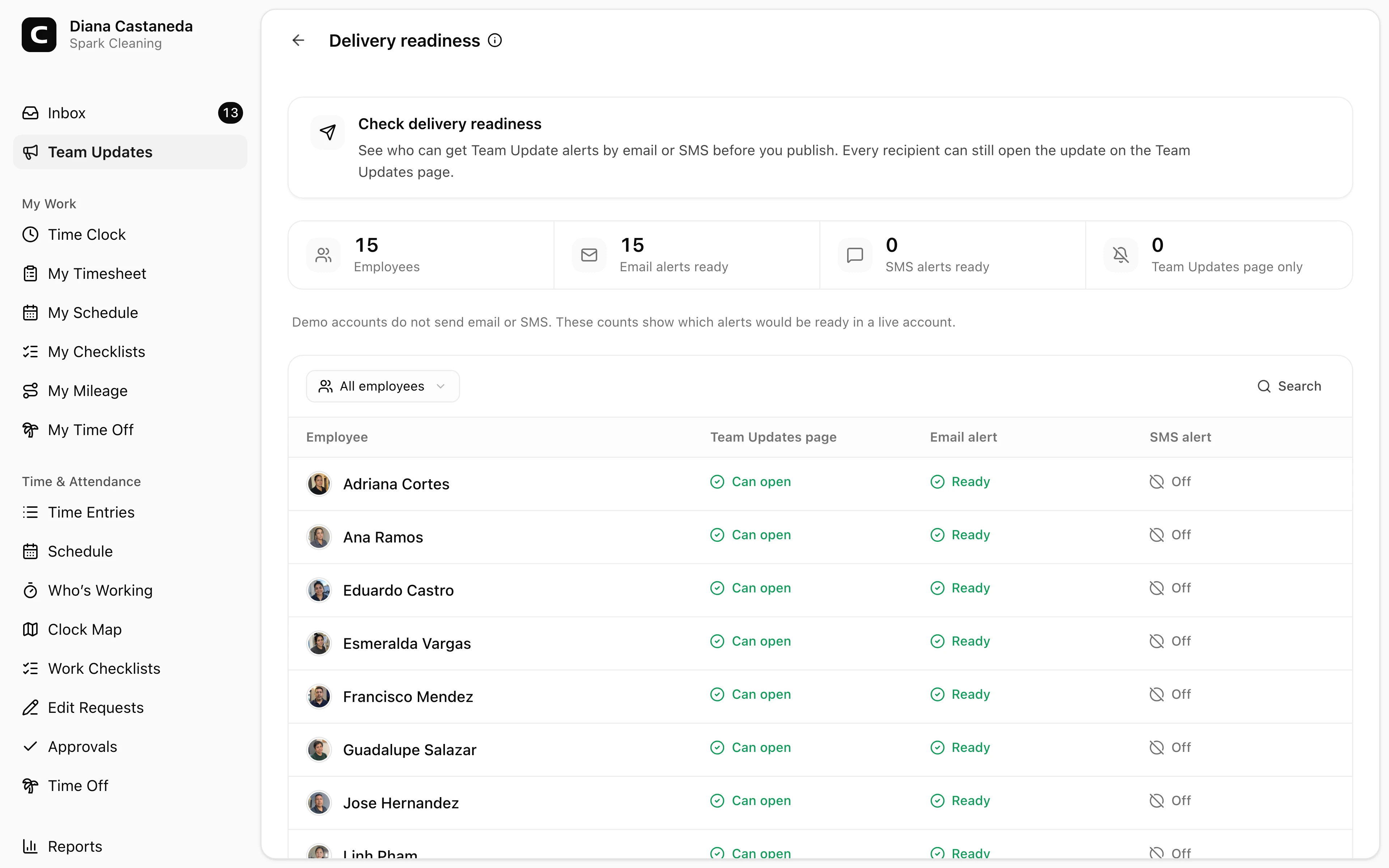
Open Team Updates and press Delivery readiness before you publish. This page shows which active employees can receive Team Update Email, SMS, or WhatsApp alerts. Every recipient can still open an update on the Team Updates page, even when no extra alert is ready.
Help employees turn on texts
Press Share setup link in the page header to see the link and choose Copy setup link. Choose Email to employees to select recipients. No employees are selected at first. Search for employees or choose Select all. Employees already set up and blocked email addresses cannot be selected.
Use Preview email to see a sample in your language. Each employee receives the email in their own language. Press Email setup link to email the selected employees. Close the email dialog to return to the link; your selections are kept. Demo accounts do not send emails.
Employees sign in and press Continue if asked to open the business named on the page.
Employees can verify their phone number in Text message setup, review the number and SMS consent, then choose Turn on text messages. Verification alone does not turn on alerts. Other notification settings won’t change.
Employees keep control of their choices; a shared link does not guarantee they will opt in or that a future text will be delivered.
Read the recipient list
Each row shows an employee’s Email, SMS, and WhatsApp setup, along with access to the Team Updates page.
Ready means the current setup allows an alert. It does not mean an update was sent or read. Press a status to see what it means.
Find who needs attention
Use Search to find an employee. Press Filter when you want to focus on a delivery gap:
- No alerts ready shows employees who will rely on the Team Updates page.
- No email alert, No SMS alert, or No WhatsApp alert isolates one channel.
- Needs setup shows a setup problem for an enabled channel, such as a missing phone number, a blocked email address, or missing WhatsApp permission.
The table always shows Can open under Team Updates page. Email, SMS, and WhatsApp show Ready, Off, or the specific setup problem.
Resolve a readiness issue
Off means the employee has that channel off for Team Update alerts in Notification Preferences. SMS not set up and WhatsApp not set up mean Clockspot’s sending setup needs attention before messages can be sent to that person.
Phone number needed means the employee must add a number on My Profile. Connection needed means they must link WhatsApp there. Permission needed means they must allow WhatsApp notifications there. For Blocked after bounce or Blocked after complaint, confirm that the employee’s email address is correct and contact Clockspot support if the block remains.
You do not need to delay an important update because an extra channel is off. Publish it to the intended audience, then tell employees to open Team Updates when another communication method is appropriate.
Common questions
- Does "No alerts ready" mean the employee cannot receive the update?
No. The employee can still open the update on Team Updates; they simply do not have a ready Email, SMS, or WhatsApp alert.
- Can I turn on an employee's alerts from this page?
No. You can share a setup link, but each employee chooses whether to turn on texts and controls their own Email, SMS, and WhatsApp choices in Notification Preferences.
- Does readiness prove delivery?
No. Readiness describes the employee's current setup before publishing. Use View delivery on a published update to review its actual delivery status.
Clockspot keeps clock-ins, corrections, approvals, and payroll-ready hours connected so owners and managers can review the workweek before payroll.
Want to simplify how your employees track time? See how Clockspot works.