Work Site Activity
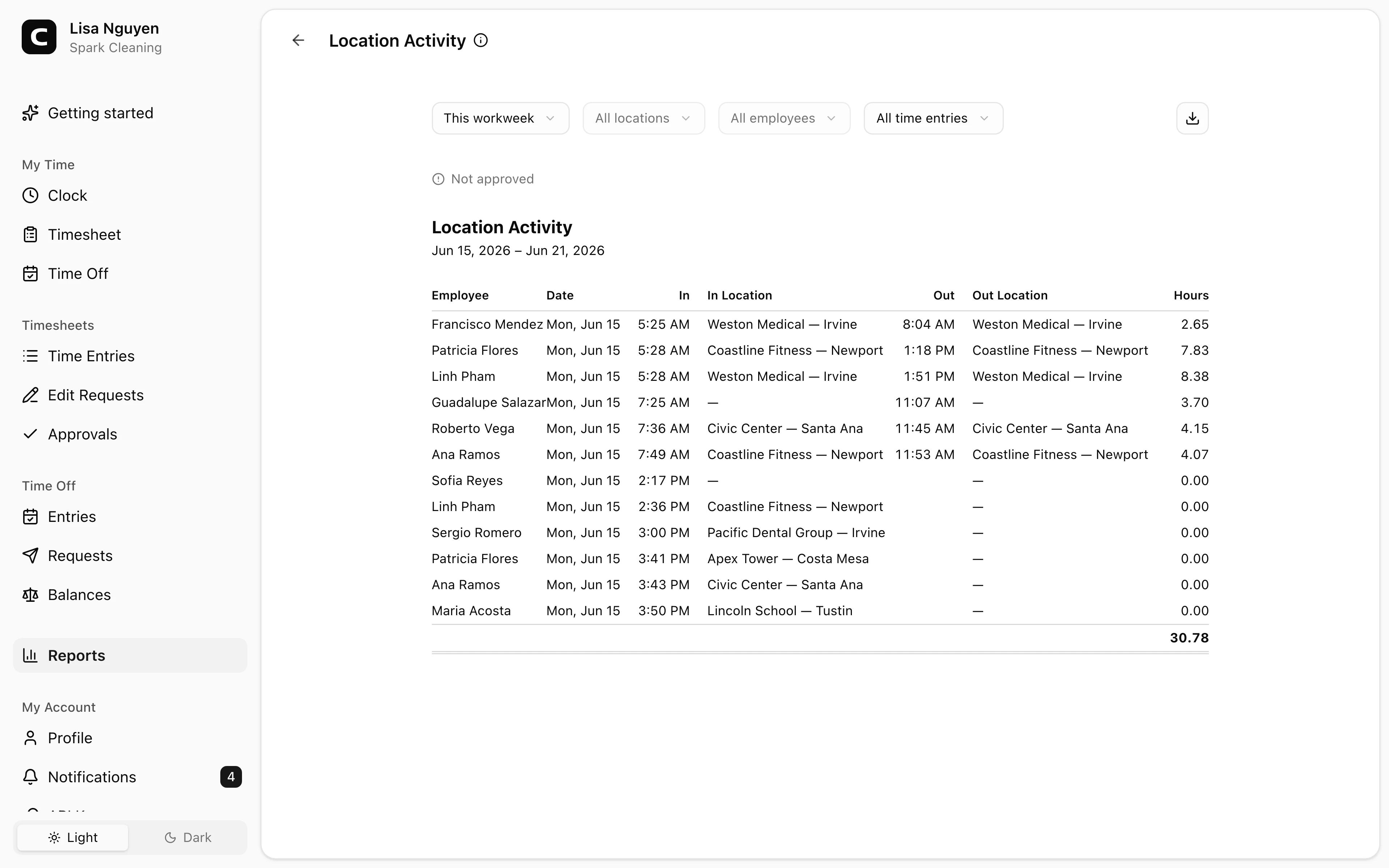
Review the Work Site attributed to each clock-in and clock-out, with enough detail to investigate unexpected or missing site activity.
Questions this report answers
- Where did each employee clock in and out?
- Can I audit the location evidence for every completed time entry?
- Which time entries have Work Site verification problems?
- Which employees clocked in and out at different locations?
No login required. Opens in one click.
What this report shows
For each entry in the date range: who clocked in, when, where, and where they clocked out. Three views:
- All time entries (default) — every entry as a flat list, sorted by time.
- By employee — grouped per employee with a per-employee subtotal.
- By date — grouped per date with a per-day subtotal.
A clock-in or clock-out without Work Site attribution is labeled No Work Site. The summary above the activity shows total time, time entries, employees, and entries with missing or changed Work Site attribution. Time in the app is shown as hours and minutes.
This report contains recorded time entries only. A clock-in blocked by the workspace's clocking-approval policy creates no time entry, so it does not appear here. Clockspot preserves the available verification evidence attached to every recorded clock event.
Filters
Date range, Work Site, employee, and view mode in the toolbar. Timesheet approval says whether the employees represented in the report have approval for the full period. Expand it to see the employee, dates, and status behind any gap.
Exporting
The export menu offers Download CSV, Download Excel, and Download PDF. The export includes the flat entry list plus employee and date breakdowns.
When to use a different report
- Hours rolled up per Work Site → Work Site Summary
- Were Work Sites covered every day? → Work Site Coverage
- Did clock events match configured approvals? → Clock Verification
- Individual clock events on a map → Clock Activity Map
Common questions
- An entry shows "No Work Site."
The event has no Work Site attribution. Use Clock Verification to review its verification outcome and any Work Site associated with the matching approval.
- The clock-out Work Site differs from the clock-in Work Site.
The two events were attributed to different Work Sites. That can be normal for mobile work, but it is worth checking when the role normally stays at one site.
Clockspot keeps clock-ins, corrections, approvals, and payroll-ready hours connected so owners and managers can review the workweek before payroll.
Want to simplify how your team tracks time? See how Clockspot works.