
 Priya PatelReady to clock in
8:42 amFriday 31 July
Patient visitsChange job
Clock in
Clock in from a phone or computer
Employees choose the Job their time is for as they clock in, from the browser they already use.
Trusted by thousands of employers since 2007
Built for small businesses with hourly employees. Employees clock in online, by phone, or at a kiosk. Managers review and approve hours before payroll.
 Marcus Brown4 AugTue8:02 amClocked in
 Priya Patel4 AugTue7:58 am11:05 am
 Angela Rivera4 AugTue8:24 amClocked in
 Keisha Williams3 AugMon8:37 am10:52 am
 Aaliyah Robinson3 AugMon8:45 am1:15 pm
 Sandra Ortiz3 AugMon9:01 am11:31 am


“Clockspot looks after keeping track of my employees' hours so I don't have to. I have saved literally hundreds of hours. Best investment I ever made!”
 Rick RobertsonRJR Cleaning ServicesVerified customer
“This is by far the best time clock yet. No central computer, no networking issues, and payroll is a snap. Payroll takes less than 5 minutes to do now.”
“This program is easy for the employees to use, and for my bookkeeper to run payroll and overtime reports. Very user friendly, and we love it.”
“Clockspot has reduced the time it takes us to do payroll by 75%, saving us 5 hours every 2 weeks.”
 Walton O'NealO'Neal's Drug StoreVerified customer
“Thanks to Clockspot, I was able to relocate to Tennessee and keep track of my employees in Florida. It gives me the peace of mind I need to expand my business.”
“Letting employees call to clock in or out has helped us save a lot of time manually entering time cards.”
Collect time
Priya PatelReady to clock inEmployees choose the Job their time is for as they clock in, from the browser they already use.
 Priya PatelClocked in · 8:42 am
Configured GPS areas check an employee's location at clock-in. A match verifies the event and can identify its Work Site.
Employees enter an ID and PIN and complete a recorded voice check, so phone punches are verified too.
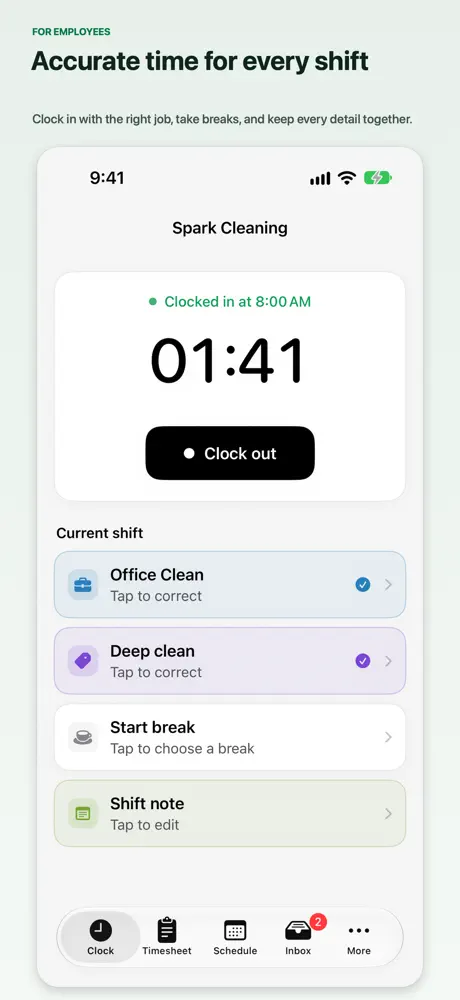
Employees can use Clockspot for iPhone or Android to track their shift, job, and breaks. They can also clock in through a browser.
Review records
 Angela RiveraFriday 31 JulyPending
Each request arrives with a reason and the original time beside it, ready for you to approve or deny.
 8–4:308–4:308–4:30
 6–26–2
 8–5
Check availability and required qualifications before assigning, let employees request open shifts, collect confirmations, and compare scheduled hours with worked hours.
Requests for paid or unpaid time off come to you for approval, with accrual rules applied and approved hours connected to schedules and payroll.
Live kiosk demo
Employees choose their name, clock in or out, enter a personal PIN, and take an optional verification photo from one shared screen. Each punch becomes a time record managers can review before payroll.
No login or setup required.
8:41 am
Monday 27 July
Main Office
 Maria Acosta
 Ana RamosLunch
 Sergio RomeroClocked in
 Esmeralda Vargas
Prepare payroll
Marcus Brown38h of 40h · ThursdayAlert sentSet custom daily or weekly overtime rules for your company. Threshold alerts warn you before an employee reaches overtime.
Marcus Brown43h 30mKeisha Williams40hApproveThe queue shows who is waiting on review, who never submitted, and who is done. Approve people one at a time or everyone who is ready at once.
Approved hours come out with regular time, overtime, double time, and PTO separated, ready for your payroll system or a flexible CSV.
Meet Spot
Spot can explain reports, help correct timesheets, and guide you through account setup. Ask in your own words, then review proposed changes in Clockspot. Also works with ChatGPT.
Alex left at 5:30, but his timesheet says 6. Can you fix it?
I’ve prepared Alex’s correction for your review.
Alex Rivera · Monday, October 5, 2026
| Before | Proposed | ||
|---|---|---|---|
| Clock out | 6:00 PM | 5:30 PM | |
| Duration | 9h | 8h 30m |
Customer story
At citywide events, City of Birmingham employees once recorded their time on paper and added up each person's hours by hand. Hear what changed for the 1,600+ people they now track.

Common questions
See the pricing page for Clockspot's current plan, free-trial terms, and billing details.
See pricingYes. Attach a checklist to a job or work site, and it opens when an employee clocks out. Each step can be marked done or flagged, with a note or a photo, and a flagged step reaches you by email or text. The report shows which steps keep failing, and where.
More on work checklistsYes. Each employee can choose English, Spanish, or Chinese, and that is the language they see when they clock in and check their timesheet, schedule, and time off. You set the company default, and the shared kiosk follows it. Phone clock-in is in English.
Clockspot preserves the context available for each clock event. GPS is recorded only when the employee clocks from their own account and grants location access. Configure Work Site GPS areas, approved IP networks, or approved browsers, then choose whether an unverified clock-in is allowed, warned, or blocked.
More on geofencingDownload approved hours as a flexible CSV for your payroll workflow. The direct QuickBooks Online connection supports U.S. companies; availability depends on your payroll provider and import format.
Explore the QuickBooks Online integrationYes. Write a Team Update once and connect it to the work it belongs to. Employees see it when they clock in for that work, with any photos or PDFs attached, and confirm they have read it. You see who has confirmed and who is still waiting, instead of repeating the same reminder to each person.
See Team UpdatesStart with one employee or invite everyone. See how clock-ins, timesheet review, and payroll-ready exports fit the way your business works.