How to Track Construction Crew Hours by Job Site
Construction crew time is hard to trust when the job site is added later from memory.
If employees split time between sites, stop at the shop, pick up materials, or move from one customer job to another, the time record should show the job context while the day is still fresh.
Decide what job detail you actually need
Start with the question the office will ask later: which employee worked on which job, for how long, and who approved it?
For many small construction crews, the useful fields are:
- Employee or crew.
- Work date.
- Clock-in and clock-out.
- Job, project, customer, or location.
- Shop, travel, or material-pickup note when needed.
- Correction reason.
- Manager or foreman approval.
Do not add ten fields if the office only uses two. But if labor cost, payroll review, or customer questions depend on job detail, capture that detail when the time happens.
Explore the sample account
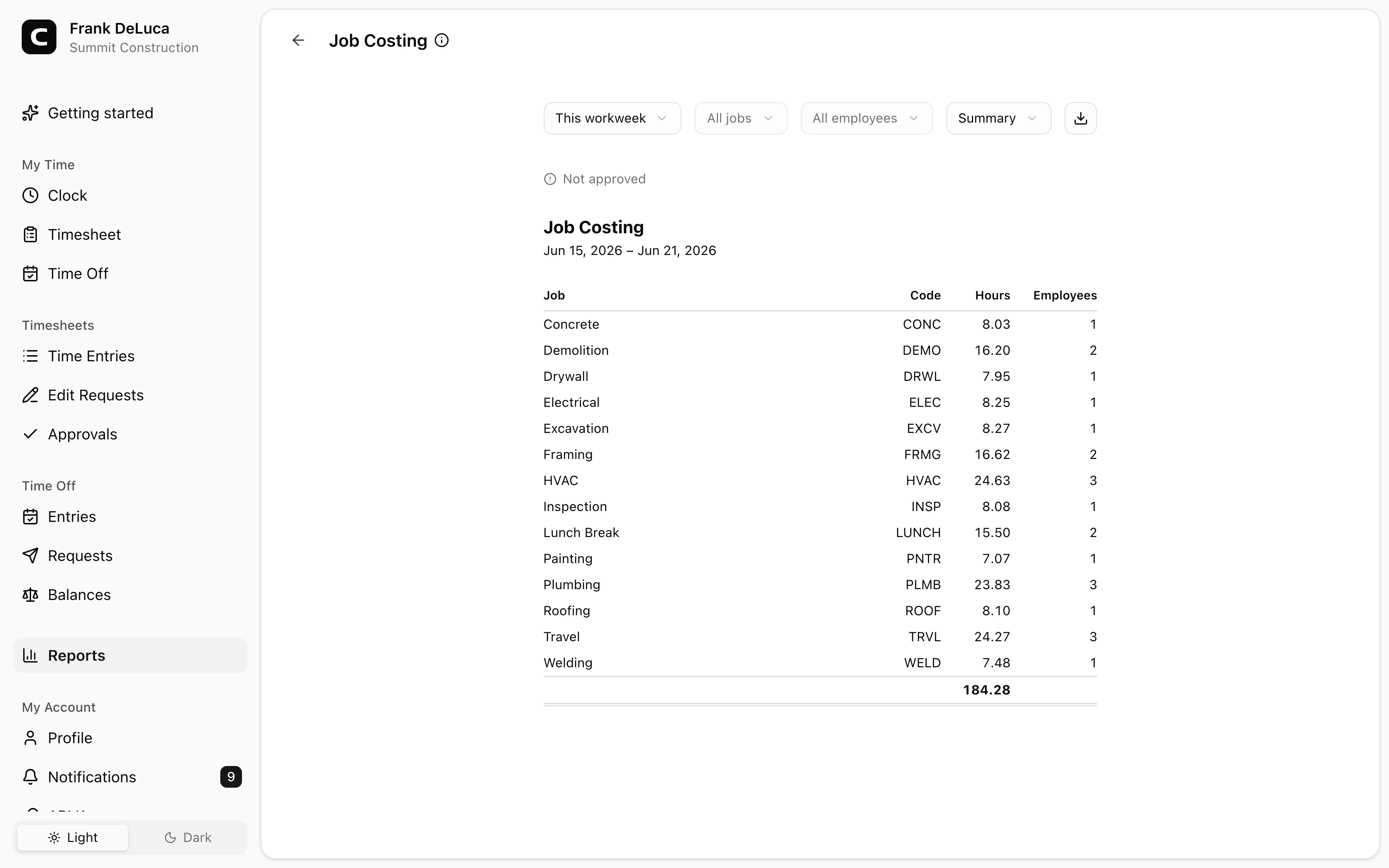
Summit Construction is an example contractor in the Denver, Colorado, metro area, with crews, job sites, GPS records, job costing, approvals, and reports already filled in with sample data.
No login required. Opens in one click.
Make the job label easy to choose
The job label should match how the crew and office already talk.
That may be:
- Customer name.
- Job address.
- Project number.
- Lot number.
- Phase or cost code.
- Shop or yard time.
If the label is too vague, the office cannot use it. If the list is too long, crews choose the wrong one. The best setup is usually the shortest list that still answers the payroll and job-costing question.
For a general guide to job and location fields, read how to track employee hours by job or location.
Review movement between sites
Multi-site days need extra attention because the time record can affect both job cost and payroll review.
A manager should be able to see:
- Where the day started.
- Which job the employee worked first.
- Whether the employee moved to another job.
- Whether shop or travel time was recorded separately when needed.
- Whether the final split was approved.
For pay-rule background, read travel time pay and mileage reimbursement requirements by state.
If you need a paper or PDF backup for crews, use the construction jobsite timesheet template. If you need written expectations, use the construction time tracking policy template.
Keep corrections explainable
Wrong-job entries happen. A crew member may choose the wrong project, forget to switch jobs, or clock in before the job list has been updated.
The correction should stay attached to the record:
- Original job or location.
- Corrected job or location.
- Reason for the change.
- Person who made or approved the correction.
That makes the record easier to trust later.
FAQ
Should construction crews track time by job site?
Yes, when job-site detail affects payroll review, job costing, billing support, manager approval, or customer questions. If nobody uses the detail, do not add it.
Is GPS enough for construction time tracking?
No. GPS can help with location context, but the record still needs clock times, job labels, corrections, approval, and payroll-ready history.
What should a construction jobsite timesheet include?
A useful jobsite timesheet includes the employee or crew, date, job or project, location, clock-in and clock-out, shop or travel notes when needed, corrections, and manager approval.
The bottom line
Track job-site time while the work is happening.
The right record lets the crew clock in quickly, lets the office review job splits before payroll, and leaves an explanation the business can find later. If that is the workflow you need, see the Clockspot construction time clock page, the Clockspot job code time clock page, or the Clockspot job costing page.
Keep reading
How to Track Employee Hours for Payroll
Use this payroll-ready time tracking workflow to capture hours, review exceptions, approve edits, and keep records you can explain later.
How to Track Employee Hours by Job or Location
Track employee hours by job or location so payroll, job costing, overtime review, and manager approval all use the right time record.
Time Clock App for Construction: What Small Crews Should Look For
Choose a construction time clock app by checking mobile clock-in, GPS, job sites, job costing, approvals, payroll export, and records crews can trust.
Photo Time Clock: When to Use Verification Photos
A photo time clock adds verification photos to kiosk clock-ins. Learn what Clockspot captures, what it does not do, and when photo capture helps.
About Clockspot
Clockspot helps small businesses track employee time and keep payroll-ready records. Used in all 50 states since 2007, we focus on getting time and pay right — including the wage-and-hour rules that shape both.
Clockspot helps field crews keep job-site hours, corrections, approvals, and payroll-ready records connected. See how Clockspot supports construction time tracking.